
Introduction
The internet is a powerful place. It helps us learn, work, shop, and stay connected with people around the world. However, along with these benefits, online risks are also growing every day. Hackers, fake websites, data theft, and online tracking are common problems that many users face without even realizing it. This is where Secure Browsing becomes extremely important for everyone, especially beginners and intermediate users.
Secure Browsing means using the internet in a safe and protected way. It helps you keep your personal data private, your devices safe, and your online activities secure. Whether you are checking emails, using social media, shopping online, or reading news, your safety depends on how carefully you browse the web.
Many people think online security is only for experts, but that is not true. With basic knowledge and simple habits, anyone can browse the internet safely. Secure Browsing is not about fear; it is about awareness and smart choices. When you understand how online threats work, you can easily avoid them.
In this guide, you will learn what Secure Browsing is, why it matters, how to practice it step by step, and what mistakes to avoid. The content is written in simple English, with real-life examples, so you can apply these tips in your daily online life without confusion or stress.
What is Secure Browsing?
Secure Browsing is the practice of using the internet in a way that protects your personal information, devices, and online identity from digital threats. It focuses on safe habits, trusted tools, and smart decisions while accessing websites and online services.
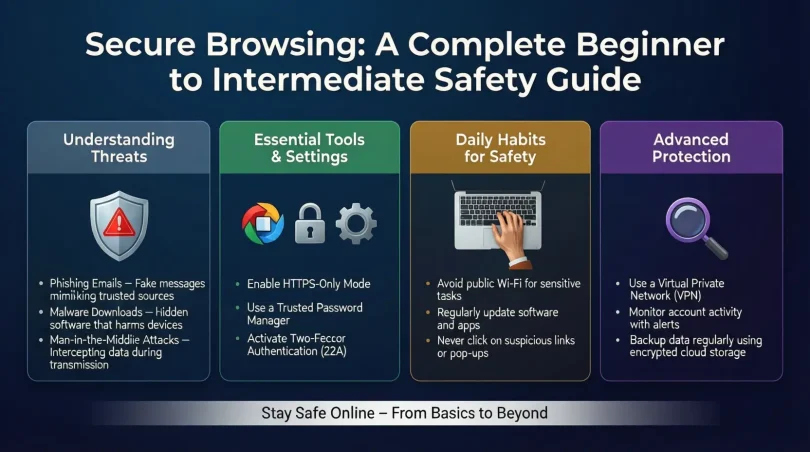
When you browse securely, you reduce the risk of malware infections, phishing attacks, data leaks, and identity theft. Secure Browsing includes checking website security, using strong passwords, keeping software updated, and avoiding suspicious links or downloads.
For example, when you see a website with “https” and a lock symbol in the address bar, it means the connection is encrypted. This is a basic sign of a secure website. Secure Browsing is not one single tool; it is a combination of awareness, settings, and behaviors that work together to keep you safe online.
Why is Secure Browsing Important?
Secure Browsing is important because the internet is not always a safe place. Every day, thousands of users lose data, money, and privacy due to unsafe browsing habits.
First, it protects your personal information such as passwords, bank details, and private messages. Second, it helps prevent malware that can slow down or damage your device. Third, it reduces the risk of online scams that trick users into sharing sensitive data.
In addition, Secure Browsing improves your overall online experience. You feel more confident, avoid stress, and spend less time fixing problems caused by security issues. For students, professionals, and families, secure internet use is no longer optional; it is necessary.
Detailed Step-by-Step Guide
Step 1: Use Updated Browsers
Always use the latest version of your web browser. Updates fix security weaknesses that attackers often exploit. Popular browsers release updates regularly to improve safety.
Step 2: Check Website Security
Before entering any personal information, check if the website uses HTTPS. Avoid websites that show warnings or look untrustworthy.
Step 3: Create Strong Passwords
Use unique and strong passwords for different websites. A strong password includes letters, numbers, and symbols. Avoid using personal information.
Step 4: Enable Browser Security Settings
Modern browsers offer built-in security features. Turn on safe browsing, pop-up blockers, and warning alerts for dangerous websites.
Step 5: Be Careful with Links and Downloads
Do not click on unknown links or download files from untrusted sources. Many cyber threats enter devices through fake downloads.
Step 6: Use Trusted Extensions Only
Browser extensions can be helpful, but only install those from trusted developers. Remove extensions you no longer use.
Step 7: Log Out on Shared Devices
If you use public or shared computers, always log out from your accounts and avoid saving passwords.
Benefits of Secure Browsing

- Protects personal and financial information
- Reduces risk of malware and viruses
- Prevents online scams and phishing attacks
- Improves device performance and stability
- Builds confidence while using the internet
- Helps maintain online privacy
- Saves time and money by avoiding security problems
Disadvantages / Risks
- Requires regular updates and attention
- Can feel confusing for beginners at first
- Some secure settings may block useful content
- Overconfidence can still lead to mistakes
- Depends on user awareness and habits
Common Mistakes to Avoid
One common mistake is ignoring browser warnings. These alerts exist for a reason and should never be skipped. Another mistake is using the same password everywhere, which increases risk if one account is compromised.
Many users also trust emails or messages without checking the source. This leads to phishing attacks. Lastly, installing random browser extensions without review can expose your data to unknown risks.
FAQs
What does Secure Browsing protect against?
Secure Browsing protects against malware, phishing, fake websites, data theft, and online tracking. It reduces common internet risks.
Is Secure Browsing only for advanced users?
No, Secure Browsing is for everyone. Beginners can follow simple steps and still stay safe online.
Can mobile users practice Secure Browsing?
Yes, mobile users should also use secure browsers, update apps, and avoid unsafe links.
Does Secure Browsing slow down the internet?
No, it usually improves performance by blocking harmful content and unwanted scripts.
Are free tools enough for Secure Browsing?
Basic secure browsing habits and free tools are enough for most users if used correctly.
How often should I update my browser?
You should update your browser whenever a new update is available to maintain security.
Expert Tips & Bonus Points
Use private browsing mode on shared devices to reduce data storage. Clear cookies and cache regularly to protect privacy. Always double-check website addresses before logging in. Teach family members basic Secure Browsing habits, especially children and seniors. Staying informed about common online threats also helps you stay one step ahead.
Conclusion
Secure Browsing is not complicated, expensive, or limited to experts. It is a set of simple habits that anyone can learn and follow. By understanding basic online risks and applying safe browsing practices, you can protect your data, privacy, and devices with confidence.
In today’s digital world, online safety is a shared responsibility. Every click, login, and download matters. Secure Browsing helps you enjoy the internet without fear, stress, or unnecessary problems. It allows you to focus on learning, working, and connecting instead of worrying about online threats.
Make Secure Browsing a daily habit. Update your browser, stay alert, and think before you click. Small steps make a big difference over time. When you browse securely, you take control of your online life and build a safer digital future for yourself and others.