
Introduction
In today’s digital world, almost everything we do is connected to the internet. From online banking and shopping to education and social media, our personal and professional lives depend heavily on technology. This is where Cyber Security becomes extremely important. It is no longer just a technical topic for IT experts. Instead, it is a basic need for everyone who uses a computer, smartphone, or internet connection.
Cyber Security protects systems, networks, and data from digital attacks. These attacks often aim to steal information, damage systems, or interrupt normal operations. As technology grows, cyber threats also become more advanced. Hackers now use smarter techniques to target individuals, small businesses, and large organizations.
For beginners, Cyber Security may sound complex and confusing. However, with the right explanation and practical examples, it becomes easier to understand. Intermediate learners can also improve their knowledge by learning structured steps and best practices. This guide is written in simple English to help both beginners and intermediate readers feel confident.
Throughout this article, you will learn what Cyber Security is, why it matters, how it works step by step, and how you can protect yourself online. You will also discover its benefits, risks, common mistakes, and expert tips. By the end, you will have a clear understanding of how to stay safe in the digital world.
What is Cyber Security?
Cyber Security is the practice of protecting computers, servers, networks, and data from unauthorized access and cyber attacks. It focuses on keeping digital information safe from hackers, malware, and data breaches.
In simple words, Cyber Security acts like a digital lock. Just as you lock your home to stay safe, Cyber Security tools and practices protect your online space. It includes technologies, processes, and rules designed to defend systems against threats.
Cyber Security covers many areas such as network security, data protection, application security, and user awareness. It also involves monitoring systems to detect suspicious activities early.
For example, when you use a strong password or enable two-step verification, you are applying basic Cyber Security practices. These small actions help prevent cyber criminals from accessing your accounts.
Why is Cyber Security Important?

Cyber Security is important because cyber threats are increasing every day. Almost everyone stores personal data online, including passwords, photos, and financial details. Without proper protection, this data can be misused.
Here are key reasons why Cyber Security matters:
First, it protects personal information. Identity theft can cause serious financial and emotional damage. Second, it secures business data. A single cyber attack can shut down operations and harm reputation.
Additionally, Cyber Security ensures system reliability. Attacks like ransomware can lock users out of their own systems. Strong security helps maintain trust between users and service providers.
Finally, it supports national and global safety. Critical systems such as healthcare, banking, and energy depend on secure networks. Without Cyber Security, these systems become vulnerable to large-scale attacks.
Detailed Step-by-Step Guide
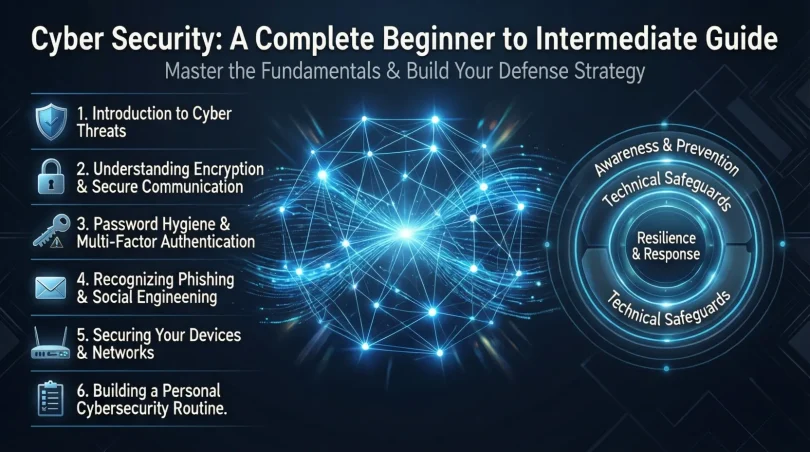
Step 1: Understand Common Cyber Threats
The first step is learning about common cyber threats. These include malware, phishing, ransomware, and spyware. Knowing how these threats work helps you recognize danger early.
For example, phishing emails often look real but aim to steal your login details. Awareness is your first line of defense.
Step 2: Use Strong Passwords
Always create strong and unique passwords. Avoid using simple words or personal details. A strong password includes letters, numbers, and symbols.
Using different passwords for different accounts adds an extra layer of protection.
Step 3: Enable Two-Factor Authentication
Two-factor authentication adds a second security step. Even if someone steals your password, they still need another code to access your account.
This simple step greatly improves Cyber Security.
Step 4: Keep Software Updated
Software updates fix security weaknesses. Always install updates for your operating system, apps, and antivirus tools.
Outdated software is an easy target for hackers.
Step 5: Use Antivirus and Firewall Protection
Antivirus software detects and removes harmful programs. Firewalls block unauthorized access to your network.
Together, they form a strong security shield.
Step 6: Secure Your Internet Connection
Use secure Wi-Fi settings and avoid public networks when possible. If you must use public Wi-Fi, avoid accessing sensitive information.
A secure connection reduces risk.
Step 7: Backup Important Data
Regular backups protect you from data loss. If your system is attacked, you can restore your files easily.
Backups are a critical part of Cyber Security planning.
Benefits of Cyber Security
- Protects personal and financial information
- Reduces risk of data theft and fraud
- Improves system reliability and performance
- Builds trust with users and customers
- Helps businesses avoid financial losses
- Ensures safe online communication
- Supports legal and regulatory compliance
Disadvantages / Risks
- High implementation costs for advanced systems
- Requires regular updates and maintenance
- Needs skilled professionals
- False sense of security if poorly managed
- Complexity for beginners
Common Mistakes to Avoid
Many people make simple mistakes that weaken Cyber Security. One common mistake is using the same password everywhere. Another is ignoring software updates.
Clicking unknown links is also risky. Many users trust emails without checking the sender. Additionally, not backing up data can lead to permanent loss.
Avoiding these mistakes greatly improves your online safety.
FAQs
What is Cyber Security in simple words?
Cyber Security means protecting computers and data from online threats. It keeps your information safe from hackers.
Is Cyber Security only for big companies?
No, Cyber Security is important for individuals, small businesses, and large organizations alike.
Can beginners learn Cyber Security easily?
Yes, beginners can start with basic practices like strong passwords and updates. Learning step by step makes it easier.
What are common Cyber Security threats?
Common threats include viruses, phishing emails, ransomware, and data breaches.
How often should I update my security tools?
You should update them regularly. Automatic updates are recommended for better protection.
Does Cyber Security guarantee full protection?
No system is 100 percent secure. However, good practices greatly reduce risk.
Expert Tips & Bonus Points
Always stay informed about new threats. Cyber threats change over time, so learning never stops.
Use password managers to handle multiple passwords safely. Educate family members and coworkers about safe online behavior.
Finally, test your security regularly. Simple checks can help identify weaknesses early.
Conclusion
Cyber Security is no longer optional in the modern digital world. As technology becomes more integrated into daily life, the risks associated with cyber threats continue to grow. Protecting your data, systems, and online identity should be a top priority for everyone, not just technical experts.
By understanding the basics of Cyber Security, you can take practical steps to stay safe online. Simple actions such as using strong passwords, updating software, and being cautious with emails can make a big difference. For businesses, investing in proper security measures helps protect reputation and customer trust.
Although Cyber Security may seem challenging at first, learning it step by step makes it manageable. With consistent effort and awareness, anyone can improve their digital safety. The key is to stay alert, informed, and proactive.
In the end, Cyber Security is about responsibility. It protects not only your own data but also contributes to a safer digital environment for everyone. By following best practices and avoiding common mistakes, you can confidently navigate the online world with greater peace of mind.