
Introduction
In today’s digital world, data has become one of the most valuable assets for individuals and businesses alike. From personal information to business records, emails, financial details, and customer data, almost every aspect of modern life depends on data. However, with the rapid growth of technology, the risk of data breaches, hacking, and unauthorized access has increased significantly. This is where data protection comes into play. Data protection is not just a technical requirement; it is a critical part of maintaining trust, privacy, and compliance in any organization or personal setup.
Many people think that data protection is only relevant to large corporations, but the truth is that anyone who uses digital devices, online services, or cloud storage is at risk. Protecting your data ensures that your sensitive information remains private, reduces the risk of identity theft, and maintains the integrity of your digital footprint. In this article, we will explore the concept of data protection in simple language, discuss why it is essential, provide a detailed step-by-step guide for implementation, highlight benefits and risks, and offer expert tips for securing data effectively.
By the end of this guide, you will have a comprehensive understanding of data protection and practical strategies to protect your personal and professional data in an increasingly digital world. Whether you are a beginner just learning about cybersecurity or an intermediate user seeking best practices, this guide has everything you need.
What is Data Protection?
Data protection refers to the process of safeguarding digital information from corruption, unauthorized access, or loss. It includes measures, tools, and policies designed to protect data from being stolen, damaged, or misused. In simple terms, data protection ensures that only authorized people can access specific information, and that data remains accurate and secure over time.
Data protection is not limited to just computers or servers. It also involves securing mobile devices, cloud accounts, email communications, and even physical documents. With the rise of online transactions, social media, and remote work, data protection has become a key component of digital safety.
Key components of data protection include:
- Data Privacy: Ensuring that personal and sensitive information is not disclosed to unauthorized individuals.
- Data Security: Implementing tools like encryption, firewalls, and antivirus software to protect against cyberattacks.
- Data Integrity: Making sure data remains accurate, reliable, and unaltered during storage or transmission.
- Data Availability: Ensuring data is accessible to authorized users when needed, even during disruptions.
Understanding these components is crucial because a breach in any one of them can lead to serious consequences, including financial loss, reputational damage, and legal liabilities.
Why is Data Protection Important?
The importance of data protection cannot be overstated. In the digital age, personal, business, and customer data is constantly at risk. Here’s why prioritizing data protection is essential:
- Prevent Identity Theft: Cybercriminals can steal personal information like social security numbers, bank accounts, or login credentials. Proper data protection prevents unauthorized access.
- Maintain Customer Trust: Businesses handling customer data must protect it to maintain trust. A data breach can damage a company’s reputation permanently.
- Compliance with Regulations: Many countries have strict data protection laws, such as GDPR in Europe and CCPA in California. Non-compliance can lead to hefty fines.
- Avoid Financial Loss: Data breaches often result in significant financial losses due to fraud, ransom payments, and business downtime.
- Safeguard Intellectual Property: For businesses, proprietary data such as product designs, research, and trade secrets must be protected to prevent competitors from gaining an unfair advantage.
- Ensure Business Continuity: Data protection measures like backups and disaster recovery plans ensure that businesses can continue operating even after cyberattacks or natural disasters.
By understanding the importance of data protection, individuals and businesses can take proactive steps to secure their digital assets.
Detailed Step-by-Step Guide to Data Protection
Protecting your data requires a structured approach. Here’s a detailed step-by-step guide for implementing effective data protection measures.
Step 1: Identify Your Data
Before you can protect your data, you need to know what data you have. Create a list of all personal or business data, including:
- Personal identification information (name, address, social security number)
- Financial information (bank details, credit card numbers)
- Business data (customer records, contracts, product designs)
- Online accounts (email, social media, cloud storage)
This inventory helps you prioritize which data needs the most protection.
Step 2: Classify Your Data
Not all data is equally sensitive. Classify your data into categories such as:
- Public: Information that can be shared freely.
- Internal: Data meant for internal use within an organization.
- Confidential: Sensitive data that must be protected from unauthorized access.
- Highly Confidential: Critical data like financial records, intellectual property, or personal identification information.
Classification helps determine the level of security needed for each type of data.
Step 3: Implement Access Controls
Access control ensures that only authorized people can access certain data. Measures include:
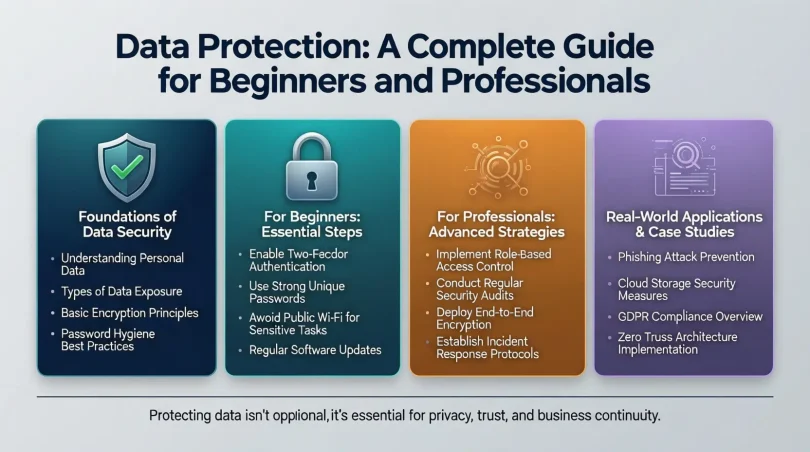
- Strong Passwords: Use unique, complex passwords for each account.
- Two-Factor Authentication (2FA): Adds an extra layer of security.
- Role-Based Access Control (RBAC): Assign access permissions based on user roles in organizations.
- Physical Security: Restrict access to servers, devices, or sensitive documents.
Step 4: Use Encryption
Encryption converts data into a coded format that only authorized users can read.
- Encrypt sensitive files stored on devices, servers, or cloud storage.
- Use encrypted communication channels like HTTPS or VPNs for online data transfer.
Step 5: Regular Backups
Backups are copies of your data stored separately to prevent loss.
- Use cloud storage or external hard drives for backups.
- Schedule automatic backups regularly.
- Test backups periodically to ensure they are working.
Step 6: Keep Software Updated
Outdated software and systems are vulnerable to cyberattacks.
- Regularly update operating systems, applications, and antivirus software.
- Enable automatic updates where possible.
Step 7: Educate Yourself and Employees
Human error is one of the leading causes of data breaches.
- Train employees on safe online behavior and phishing prevention.
- Learn to recognize suspicious emails, links, or attachments.
Step 8: Implement a Data Protection Policy
A clear data protection policy outlines how data should be handled and secured.
- Define roles and responsibilities for data protection.
- Include procedures for reporting breaches.
- Review and update the policy regularly.
Step 9: Monitor and Audit
Continuous monitoring helps detect breaches or suspicious activity early.
- Use monitoring tools to track access to sensitive data.
- Conduct regular audits to ensure compliance with data protection standards.
Benefits of Data Protection
Implementing data protection measures provides numerous advantages. Key benefits include:
- Enhanced Security: Protects sensitive information from cyberattacks, theft, or unauthorized access.
- Legal Compliance: Ensures adherence to regulations like GDPR and CCPA.
- Customer Trust: Builds confidence among customers and clients.
- Business Continuity: Reduces downtime and ensures smooth operations during disruptions.
- Financial Savings: Minimizes costs associated with data breaches and fines.
- Reputation Management: Maintains a positive brand image by avoiding publicized breaches.
- Intellectual Property Protection: Safeguards trade secrets and proprietary information.
Disadvantages / Risks of Data Protection
While data protection is crucial, it also comes with certain challenges:
- Implementation Costs: Security software, encryption, and backups may involve significant investment.
- Complexity: Managing large volumes of data and multiple security measures can be complex.
- Time-Consuming: Training, monitoring, and auditing require ongoing effort.
- User Resistance: Employees may resist changes or additional security procedures.
- False Sense of Security: Relying solely on technology without monitoring human behavior can still lead to breaches.
Understanding these risks allows organizations to plan effectively and balance cost, effort, and security.
Common Mistakes to Avoid
Many individuals and organizations make common mistakes that compromise data protection:
- Weak Passwords: Using simple or repeated passwords makes accounts vulnerable.
- Ignoring Software Updates: Outdated software can be exploited by hackers.
- Neglecting Backups: Failing to back up data can result in permanent loss.
- Phishing Scams: Clicking on unknown links or attachments can lead to breaches.
- Sharing Sensitive Data Carelessly: Sharing passwords or confidential files via unsecured channels.
- No Encryption: Storing sensitive data without encryption makes it easy for attackers to access.
- Lack of Awareness: Employees or users unaware of security threats increase vulnerability.
Avoiding these mistakes is critical for a robust data protection strategy.
FAQs About Data Protection
1. What is the difference between data protection and data privacy?
Data protection focuses on securing data from unauthorized access or loss, while data privacy ensures that personal information is collected, used, and shared responsibly according to regulations. Both are interconnected but distinct concepts.
2. How can I protect my personal data online?
Use strong passwords, enable two-factor authentication, avoid suspicious links, encrypt sensitive files, and regularly update software. Additionally, limit the amount of personal information shared on social media.
3. Is cloud storage safe for storing data?
Yes, cloud storage can be secure if proper measures are in place, such as encryption, strong passwords, and access control. Always choose reputable cloud providers with robust security policies.
4. What should I do if my data is breached?
Immediately change passwords, notify relevant authorities or affected parties, check for suspicious activity, and restore data from backups if needed. Conduct an audit to identify and fix vulnerabilities.
5. Are small businesses at risk of data breaches?
Yes, small businesses are often targets because they may lack advanced security measures. Implementing basic data protection measures is essential for businesses of all sizes.
6. How often should I back up my data?
Data should be backed up regularly, depending on usage. For personal data, weekly backups may be sufficient, while businesses with critical information may require daily or even hourly backups.
7. What is encryption, and why is it important?
Encryption converts data into a coded format that only authorized users can access. It protects sensitive information from hackers and unauthorized access, both during storage and transmission.
8. Can antivirus software fully protect my data?
Antivirus software is an important layer of protection but cannot guarantee complete security. Combining antivirus, firewalls, encryption, strong passwords, and user awareness is necessary for comprehensive protection.
Expert Tips & Bonus Points
- Use Password Managers: Password managers can generate strong, unique passwords for all accounts.
- Enable Multi-Factor Authentication (MFA): MFA provides an extra layer of protection beyond passwords.
- Regularly Update Security Policies: Ensure your data protection policies evolve with changing technology and threats.
- Monitor Access Logs: Keep track of who accesses sensitive data to detect unusual activity.
- Educate Employees Continuously: Frequent training reduces the risk of human errors leading to breaches.
- Segment Your Network: Limit access to sensitive data to specific segments of your network.
- Test Backups and Recovery Plans: Regularly verify that your backup system works as intended.
- Stay Informed About Threats: Follow cybersecurity news to be aware of new risks and solutions.
Bonus: Consider cybersecurity insurance for high-value data to mitigate financial losses in case of a breach.
Conclusion
Data protection is no longer optional in the digital age—it is a necessity. Whether you are an individual, small business, or large organization, safeguarding your data ensures privacy, security, and trust. By understanding what data protection is, why it is important, and how to implement effective measures, you can prevent unauthorized access, reduce financial losses, and maintain compliance with regulations.
In addition, following expert tips, avoiding common mistakes, and regularly monitoring your data security practices will significantly strengthen your protection strategy. Remember, data protection is a continuous process, not a one-time effort. Regular updates, education, and vigilance are the keys to keeping your data safe in an ever-evolving digital landscape.
Investing time and resources in data protection today can save you from potential risks and losses tomorrow. Start small with strong passwords, backups, and encryption, and gradually build a comprehensive security framework that ensures your digital information remains secure, accessible, and trustworthy.