
Introduction
In today’s connected world, almost everything we do depends on the internet. From online learning and remote work to shopping and banking, our daily lives are deeply linked to digital platforms. Because of this, Internet Security has become a basic need, not an optional feature. Many beginners think security is only for big companies or technical experts, but that is not true. Every internet user faces risks, whether they are using a smartphone, laptop, or tablet.
Cyber threats are growing fast and becoming smarter each year. Hackers no longer target only large systems. They also focus on individuals, families, students, and small businesses. A weak password, unsafe website, or careless click can lead to data loss, identity theft, or financial damage. This is why understanding Internet Security is so important for everyone.
The good news is that protecting yourself online does not have to be complicated. With the right knowledge and simple habits, you can reduce most risks. This guide is written in clear and simple English to help beginners and intermediate readers understand how online protection works. You will learn what internet protection really means, why it matters, and how to apply it step by step in daily life. By the end, you will feel more confident and safer while using the internet.
What is Internet Security?
Internet Security refers to the methods, tools, and practices used to protect devices, networks, and data from online threats. Its main goal is to keep information safe from unauthorized access, damage, or misuse. This includes protecting personal details, financial data, emails, and online accounts.
At its core, online protection focuses on three key areas: confidentiality, integrity, and availability. Confidentiality ensures that only authorized people can access information. Integrity makes sure data is not changed without permission. Availability ensures systems and data are accessible when needed.
Internet protection covers many technologies and actions. These include antivirus software, firewalls, secure passwords, encryption, and safe browsing habits. It also involves user awareness, which is often the weakest point in security. Even strong systems can fail if users ignore basic safety rules.
For example, when you use a secure website with HTTPS, your data is encrypted during transfer. When you update your apps, security patches fix known weaknesses. All these small actions work together to create a safer online environment. Understanding these basics is the first step toward strong digital protection.
Why is Internet Security Important?
The importance of Internet Security cannot be overstated. As more personal and professional activities move online, the risks also increase. One major reason security matters is data protection. Personal information like names, addresses, passwords, and bank details are valuable to cybercriminals.
Another reason is financial safety. Online fraud, fake shopping sites, and phishing emails can lead to direct money loss. Without proper protection, a single mistake can empty accounts or misuse credit cards. Strong security measures help prevent such incidents.
Privacy is also a key concern. Many people share photos, messages, and opinions online. Without protection, this information can be tracked, stolen, or misused. Internet protection helps maintain personal privacy and control over shared content.
Finally, security builds trust. Businesses rely on secure systems to protect customers. Students depend on safe platforms for learning. When systems are secure, users feel confident and productive. In short, internet safety supports a stable, trustworthy digital world for everyone.
Detailed Step-by-Step Guide
Step 1: Secure Your Devices
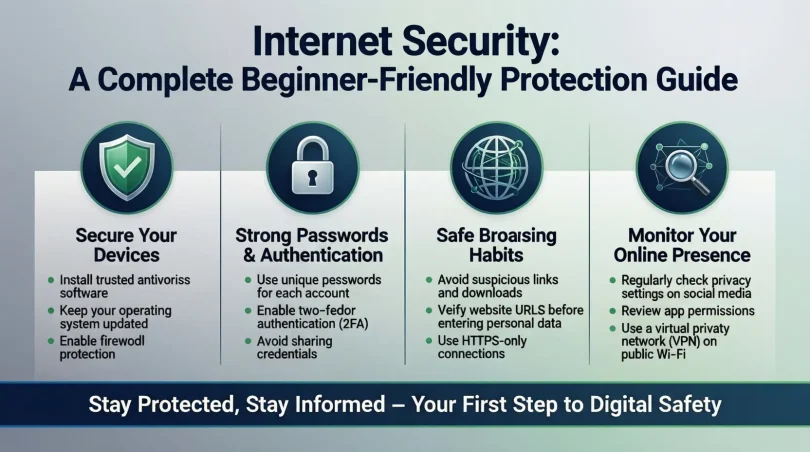
Start by protecting the devices you use every day. Install reliable antivirus software and keep it updated. Enable automatic updates for your operating system to fix security flaws quickly.
Step 2: Use Strong Passwords
Create unique passwords for each account. Use a mix of letters, numbers, and symbols. Avoid using personal details like birthdays. A password manager can help store them safely.
Step 3: Enable Two-Factor Authentication
Two-factor authentication adds an extra layer of protection. Even if someone steals your password, they cannot access your account without the second verification step.
Step 4: Browse Safely
Always check website addresses before entering information. Avoid clicking on unknown links or pop-ups. Use secure networks, especially when handling sensitive data.
Step 5: Protect Your Network
Secure your home Wi-Fi with a strong password and encryption. Change default router settings and update firmware regularly to block unwanted access.
Step 6: Be Careful with Emails
Phishing emails look real but are dangerous. Do not open attachments or links from unknown senders. Verify messages before responding or sharing information.
Step 7: Back Up Your Data
Regular backups protect you from data loss caused by malware or system failure. Store backups in secure locations, both online and offline.
Benefits of Internet Security
- Protects personal and financial information from theft
- Reduces the risk of online fraud and scams
- Maintains privacy and data control
- Builds trust in online services
- Prevents malware and ransomware attacks
- Supports safe communication and transactions
Disadvantages / Risks

- Security tools may slow down older devices
- Some solutions require paid subscriptions
- Overconfidence can lead to careless behavior
- Poor setup can create false protection
- Constant updates may feel inconvenient
Common Mistakes to Avoid
Many users believe security software alone is enough. This mindset is risky because human actions play a big role in safety. Another common mistake is reusing the same password across multiple accounts. If one account is compromised, others become easy targets.
Ignoring software updates is also dangerous. Updates often fix known weaknesses that attackers exploit. Using public Wi-Fi without protection is another frequent error, especially for beginners.
People also trust emails or messages too quickly. Cybercriminals use urgency and fear to trick users. Finally, failing to back up data can turn a small attack into a major disaster. Avoiding these mistakes greatly improves overall protection.
FAQs
What is the biggest threat to online users?
The biggest threat is phishing. It tricks users into giving away personal information by pretending to be trusted sources.
Is free antivirus software enough?
Free tools offer basic protection, but paid versions usually provide better features and support.
How often should passwords be changed?
Passwords should be updated every few months, especially for important accounts like email and banking.
Can mobile devices be attacked?
Yes, smartphones and tablets are common targets and need the same protection as computers.
Is public Wi-Fi safe to use?
Public Wi-Fi is risky. Avoid accessing sensitive accounts unless using a secure connection.
Do beginners really need Internet Security?
Yes, beginners are often targeted because attackers assume they lack awareness and experience.
Expert Tips & Bonus Points
Always stay informed about new threats and trends. Follow basic security news and updates. Use different email addresses for personal and important accounts. Review privacy settings on social platforms regularly. Teach family members about safe online habits. Small actions, when done consistently, create strong protection. Remember that Internet Security is not a one-time task but an ongoing process that grows with your digital life and experience over time.
Conclusion
Internet Security is no longer optional in the modern digital world. As our dependence on online services grows, so do the risks connected to them. From simple browsing to financial transactions, every online action carries some level of exposure. Understanding how protection works helps reduce fear and confusion, especially for beginners.
This guide has shown that online safety is built on awareness, smart habits, and basic tools. You do not need advanced technical skills to stay protected. By securing devices, using strong passwords, staying alert, and updating systems, most threats can be avoided. The key is consistency and attention.
Security is a shared responsibility. When individuals take protection seriously, the internet becomes safer for everyone. By applying these steps and tips, you can enjoy the benefits of the digital world with confidence and peace of mind. A secure internet experience starts with informed choices and continues with daily care and responsibility.