
Introduction
In today’s digital world, online safety is no longer optional. Every time you browse the internet, download an app, or open an email, your device faces potential security threats. One of the most common warning signs of these threats is Malware Alerts. These alerts are designed to inform users when harmful software tries to enter or already exists on their devices. However, many people either ignore these warnings or panic when they see them.
Malware Alerts play a key role in protecting computers, smartphones, and networks. They act as an early warning system, helping users take quick action before serious damage happens. For beginners, these alerts can feel confusing or even frightening. For intermediate users, understanding them better can improve response time and overall security.
Unfortunately, not all alerts are genuine. Fake warnings, scare tactics, and misleading pop-ups are also common. This makes it even more important to understand how real alerts work and how to respond correctly. When used properly, Malware Alerts help prevent data loss, identity theft, financial fraud, and system crashes.
This guide explains Malware Alerts in simple English, using clear examples and step-by-step instructions. By the end, you will know how to recognize real alerts, avoid scams, and protect your digital life with confidence. Whether you use a computer for work, study, or daily tasks, learning about Malware Alerts is a smart and necessary step.
What is Malware Alerts?

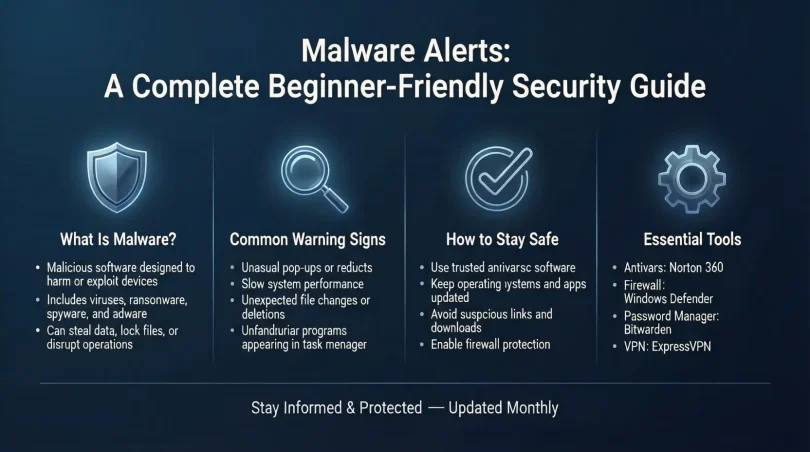
Malware Alerts are security warnings generated by antivirus software, operating systems, or security tools. They notify users when malicious software is detected or suspected on a device. Malware includes viruses, spyware, ransomware, worms, and trojans that can harm systems or steal information.
These alerts usually appear as pop-up messages, notifications, or system warnings. Their main purpose is to inform users about a threat and guide them toward a solution. A real alert clearly explains the issue and suggests safe actions.
Malware Alerts can be triggered by suspicious files, unsafe websites, or unusual system behavior. They help users act early before malware spreads or causes damage.
Why is Malware Alerts Important?
Malware Alerts are important because they provide timely protection. Without alerts, users may not realize their devices are under attack until it is too late.
Key reasons Malware Alerts matter include:
- They warn users before serious harm occurs
- They reduce the risk of data theft and privacy loss
- They help prevent financial and identity fraud
- They protect system performance and stability
By paying attention to Malware Alerts, users can stop threats early and keep their devices secure.
Detailed Step-by-Step Guide
Step 1: Identify the Alert Source
Check where the alert is coming from. Trusted sources include installed antivirus software or system security tools. Unknown pop-ups from browsers are often fake.
Step 2: Read the Alert Carefully
Genuine Malware Alerts use clear language and provide details. Fake alerts use fear tactics, urgent language, or ask for payment.
Step 3: Avoid Clicking Unknown Links
Do not click links inside suspicious alerts. Instead, open your antivirus program directly.
Step 4: Run a Full System Scan
Use your security software to scan the entire device. This confirms whether malware exists.
Step 5: Follow Recommended Actions
If malware is found, follow official removal steps provided by your software.
Step 6: Update Security Tools
Ensure your antivirus and system updates are current. Updates improve protection.
Benefits of Malware Alerts
- Early detection of threats
- Reduced risk of data loss
- Improved device performance
- Better online safety awareness
- Protection against financial scams
Disadvantages / Risks
- Fake alerts can confuse users
- Over-alerting may cause alert fatigue
- Some alerts require paid software
- Misinterpretation can lead to panic
Common Mistakes to Avoid
Many users ignore Malware Alerts or click suspicious pop-ups without thinking. Others disable alerts completely, leaving devices unprotected. Avoid trusting unknown warnings or downloading unverified tools.
FAQs
What should I do if I get a malware alert?
Stay calm, check the source, and run a system scan using trusted security software.
Are browser malware alerts real?
Most browser pop-ups are fake. Real Malware Alerts come from installed security programs.
Can malware alerts be scams?
Yes, many fake alerts are designed to scare users into downloading harmful software.
How often should I scan my device?
A weekly scan is recommended, with real-time protection enabled.
Do mobile devices get malware alerts?
Yes, smartphones and tablets also receive alerts from security apps.
Can I turn off malware alerts?
It is not recommended. Alerts help protect your device from threats.
Expert Tips & Bonus Points
- Keep software updated at all times
- Use reputable antivirus programs
- Educate family members about fake alerts
- Avoid downloading files from unknown sources
- Back up important data regularly
Conclusion
Malware Alerts are an essential part of modern digital security. They act as an early warning system, helping users detect and stop threats before serious damage occurs. For beginners, understanding these alerts builds confidence and reduces fear. For intermediate users, it sharpens awareness and improves response time.
By learning how Malware Alerts work, users can avoid scams, protect personal information, and maintain device performance. The key is recognizing real alerts, ignoring fake warnings, and following safe steps when a threat appears.
Online threats continue to evolve, but awareness remains the strongest defense. When used wisely, Malware Alerts become a powerful tool for safer browsing and secure digital experiences. Taking them seriously today can prevent major problems tomorrow.