
Introduction
In today’s digital world, personal information is more valuable than ever. Every day, we share data online, whether through social media, apps, or websites. Without proper protection, this data can be accessed by unauthorized users, leading to identity theft, hacking, or unwanted exposure. This is where privacy settings come into play. By understanding and correctly using privacy settings, you can control who sees your information and how it is used.
For beginners and intermediate users, privacy settings may seem confusing. However, once you grasp the basics, it becomes straightforward to manage your digital footprint. Whether you are adjusting settings on social media, messaging apps, or even your smartphone, these tools help you maintain control over your personal data.
In this guide, we will explore what privacy settings are, why they are important, how to configure them step by step, and the benefits and risks associated with them. We will also cover common mistakes to avoid, frequently asked questions, and expert tips to ensure your online privacy stays intact. By the end of this article, you will have a complete understanding of how to protect your personal information effectively.
What is Privacy Settings?
Privacy settings are tools provided by digital platforms, applications, and devices that allow users to control access to their personal information. They define who can see your content, contact you, or collect data about your activities.
For example, social media platforms like Facebook, Instagram, and Twitter offer privacy settings that allow you to:
- Decide who can view your posts and profile
- Limit access to your personal information such as phone numbers or email addresses
- Control who can send you messages or friend requests
Similarly, messaging apps, web browsers, and smartphones provide privacy settings to manage:
- Location tracking
- Ad personalization
- Data sharing with third-party apps
In simple terms, privacy settings are your digital “gatekeepers.” They help you decide which parts of your online life are public, private, or shared with specific people.
Why is Privacy Settings Important?
Privacy settings are essential for several reasons:
- Protect Personal Information: Personal data like emails, phone numbers, and addresses can be misused if not secured.
- Prevent Identity Theft: Hackers often exploit weak privacy controls to steal identities.
- Control Online Reputation: Your online presence affects your personal and professional image. Privacy settings help you control what others can see.
- Reduce Targeted Ads: By managing privacy preferences, you can limit how your data is used for advertising.
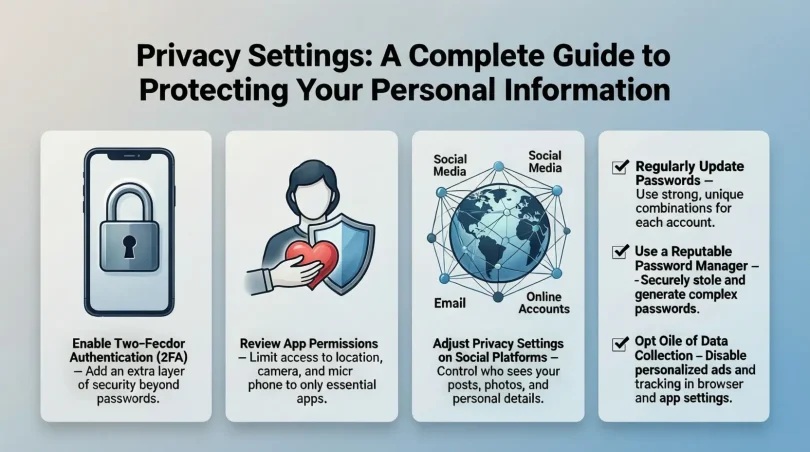
- Enhance Security: Privacy settings often include features like two-factor authentication, which increases account safety.
Without proper privacy settings, your personal data can be exposed, leading to financial loss, emotional stress, or even harassment. Therefore, using privacy settings is not optional—it is necessary in the digital age.
Detailed Step-by-Step Guide to Privacy Settings
1. Privacy Settings on Social Media
Facebook:
- Open Facebook and go to Settings & Privacy.
- Click on Privacy Shortcuts.
- Adjust who can see your posts: Public, Friends, or Only Me.
- Review profile information visibility.
- Enable two-factor authentication for extra security.
Instagram:
- Go to Settings → Privacy.
- Switch to a private account if you want only approved followers to see your content.
- Manage story visibility by selecting who can view or reply.
- Control interactions such as comments and tags.
Twitter/X:
- Open Settings and Privacy.
- Click on Privacy and Safety.
- Protect your tweets to allow only approved followers to see them.
- Control direct messages, location sharing, and personalization options.
2. Privacy Settings on Messaging Apps
WhatsApp:
- Go to Settings → Privacy.
- Adjust last seen, profile photo, and about visibility.
- Control who can add you to groups.
- Enable two-step verification.
Telegram:
- Open Settings → Privacy and Security.
- Control who can see your phone number, last seen, and profile picture.
- Enable passcode lock and two-factor authentication.
3. Privacy Settings on Smartphones
Android:
- Open Settings → Privacy.
- Manage app permissions for location, camera, and microphone.
- Limit data collection and ad personalization.
iOS (iPhone):
- Go to Settings → Privacy.
- Review which apps have access to sensitive information.
- Turn on location-based privacy controls.
- Enable features like App Tracking Transparency.
4. Browser and Online Accounts
- Browser Privacy: Use incognito mode, disable third-party cookies, and limit location sharing.
- Email Accounts: Review privacy settings for email forwarding, ad tracking, and spam filters.
- Cloud Services: Check who can access your files and enable encryption where possible.
5. General Tips for Privacy Settings
- Regularly update passwords.
- Review privacy settings after app updates.
- Avoid oversharing personal information online.
- Use multi-factor authentication for critical accounts.
Benefits of Privacy Settings

Using privacy settings provides several advantages:
- Enhanced Security: Protects against hacking and phishing.
- Controlled Information Sharing: You decide who sees your data.
- Better Online Reputation Management: Prevents unwanted exposure.
- Reduced Spam and Ads: Limits data collection for marketing purposes.
- Peace of Mind: Provides confidence that your personal information is safe.
Disadvantages / Risks of Poor Privacy Settings
Ignoring privacy settings can have serious consequences:
- Identity Theft: Personal information can be stolen.
- Cyberbullying and Harassment: Inappropriate access to your data can lead to online threats.
- Financial Loss: Hackers can gain access to banking or payment information.
- Unwanted Advertising: Your data can be misused for targeted ads.
- Data Misuse by Third Parties: Apps may sell your information without consent.
Common Mistakes to Avoid
- Using default settings and not customizing privacy preferences.
- Sharing sensitive information publicly without restrictions.
- Ignoring app permissions and allowing unnecessary data access.
- Failing to update passwords regularly.
- Assuming that privacy settings are permanent—platform updates can change them.
- Not enabling multi-factor authentication.
FAQs About Privacy Settings
1. What are the essential privacy settings everyone should enable?
Everyone should enable two-factor authentication, limit public access to posts, control app permissions, and review location-sharing settings.
2. Can privacy settings prevent hacking completely?
While privacy settings greatly reduce risks, no system is entirely foolproof. Using strong passwords and multi-factor authentication adds extra protection.
3. How often should I review my privacy settings?
Privacy settings should be reviewed at least every 3–6 months and after any major app or platform updates.
4. Are privacy settings the same on all devices?
No. Settings may vary between Android, iOS, and web platforms. Always check each device individually.
5. What happens if I ignore privacy settings?
Ignoring privacy settings increases the risk of identity theft, data misuse, unwanted ads, and online harassment.
6. Can I hide my location from apps without turning off GPS?
Yes. Most smartphones allow location sharing only while using the app or with selected apps, providing better privacy control.
7. Are privacy settings permanent?
No. Platform updates, app permissions, or default settings may reset your preferences. Regular checks are necessary.
8. Can privacy settings protect my children online?
Yes. Many platforms provide parental controls to restrict access, content, and interactions for children.
Expert Tips & Bonus Points
- Use a Password Manager: Store strong, unique passwords securely.
- Regularly Audit Apps: Remove apps that are no longer needed to reduce data exposure.
- Enable Encrypted Messaging: Use apps that provide end-to-end encryption.
- Limit Social Media Sharing: Avoid sharing sensitive information such as addresses or financial details.
- Monitor Data Breaches: Use online tools to check if your data has been compromised.
- Educate Yourself: Stay informed about new privacy features and online threats.
Conclusion
Privacy settings are an essential part of digital life. They empower you to control who can access your personal information and how your data is used. By actively managing these settings, you reduce the risk of identity theft, cyberbullying, and unwanted advertising.
For beginners and intermediate users, learning to navigate privacy settings may seem overwhelming at first. However, by following the step-by-step guidance in this article, you can secure your online accounts and devices effectively. Regularly reviewing and updating your privacy preferences ensures long-term safety.
Ultimately, privacy settings are not just a feature—they are a responsibility. Protecting your digital footprint gives you peace of mind, security, and control over your online life. Take charge of your privacy today and enjoy a safer online experience.