
Introduction
In today’s digital world, almost everything we do starts with a login. From social media accounts and email to banking apps and work dashboards, our online identity depends on secure access. This is where Login Protection plays a critical role. It acts as the first line of defense against unauthorized access, data theft, and online fraud. Without strong protection at the login stage, even the most advanced security systems can fail.
As more people move their personal and professional lives online, cybercriminals are constantly looking for weak login systems to exploit. Simple passwords, reused credentials, and careless login habits make accounts easy targets. Beginners often underestimate these risks, while intermediate users may rely on outdated methods that no longer offer enough safety.
This guide is designed to explain everything about Login Protection in clear and simple English. You will learn what it is, why it matters, and how to implement it step by step. Real-life examples, practical tips, and common mistakes are included to help you understand both the technical and human sides of login security.
Whether you manage a website, use mobile apps, or simply want to protect your personal accounts, this article will give you a strong foundation. By the end, you will know how to create safer login systems and habits that protect your data, privacy, and peace of mind in a connected world.
What is Login Protection?
Login Protection refers to the methods and technologies used to secure the login process of a digital system. Its main goal is to ensure that only authorized users can access an account, application, or network.
At its core, it starts with verifying identity. Traditionally, this was done using a username and password. Today, Login Protection goes far beyond that. It includes multiple layers of checks designed to stop attackers even if one layer fails.
These methods can include strong password policies, two-factor authentication, biometric verification, device recognition, and behavior monitoring. Together, they reduce the chances of unauthorized access.
For beginners, think of it like locking your house. A simple lock may stop casual intruders, but a determined thief can break in. Adding alarms, cameras, and secure doors makes your home much safer. Login Protection works in the same layered way.
For businesses, it protects customer data and company resources. For individuals, it protects personal information, photos, messages, and finances. In both cases, it builds trust and safety in digital interactions.
Why is Login Protection Important?
The importance of Login Protection has grown rapidly as cyber threats increase. One weak login can lead to serious consequences for individuals and organizations.
First, it prevents unauthorized access. Hackers often use stolen passwords from data breaches to break into other accounts. Strong protection stops these attacks early.
Second, it protects sensitive data. Personal details, financial information, and private messages can be exposed if login security fails. This can lead to identity theft and financial loss.
Third, it helps maintain trust. Users expect platforms to protect their accounts. A secure login system builds confidence and loyalty.
Finally, it supports compliance. Many industries require strong login security to meet legal and regulatory standards. Ignoring this can result in penalties and reputation damage.
In short, Login Protection is not optional. It is a basic requirement for safe digital life.
Detailed Step-by-Step Guide
Step 1: Create Strong Password Policies
A strong password is the foundation of secure login.
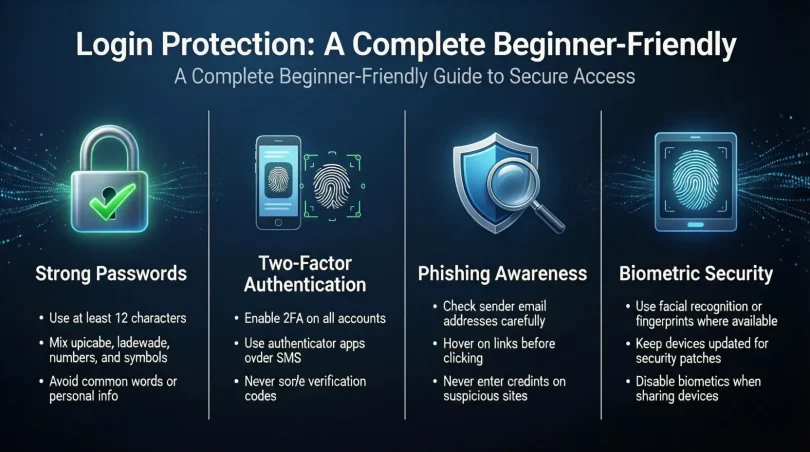
Use passwords that are long and complex. Combine uppercase letters, lowercase letters, numbers, and symbols. Avoid common words and personal information.
Encourage users to create unique passwords for each account. Reusing passwords is one of the biggest security risks today.
Step 2: Enable Two-Factor Authentication
Two-factor authentication adds an extra layer of security.
After entering a password, the user must verify their identity using a second method. This can be a code sent to a phone, an authentication app, or a hardware key.
Even if a password is stolen, this step blocks unauthorized access.
Step 3: Use Biometric Authentication
Biometrics use physical traits such as fingerprints or facial recognition.
These methods are convenient and hard to fake. Many smartphones and laptops already support them.
Biometrics should be used alongside other methods, not as the only protection.
Step 4: Monitor Login Activity
Tracking login attempts helps detect suspicious behavior.
Unusual locations, devices, or repeated failed attempts can signal an attack. Systems should alert users or temporarily block access in such cases.
Step 5: Implement Account Lockout Rules
Account lockout rules limit repeated login attempts.
After several failed attempts, the account is temporarily locked. This prevents brute-force attacks that try many passwords quickly.
Step 6: Educate Users
Technology alone is not enough.
Teach users about phishing, fake login pages, and safe password habits. Awareness reduces human errors that attackers exploit.
Benefits of Login Protection
- Reduces the risk of unauthorized access
- Protects sensitive personal and business data
- Builds user trust and confidence
- Helps meet security and compliance standards
- Prevents financial loss and identity theft
- Improves overall system security
Disadvantages / Risks
- Can add extra steps to the login process
- May cause inconvenience for some users
- Requires proper setup and maintenance
- Biometric systems can raise privacy concerns
- Poor implementation can frustrate users
Common Mistakes to Avoid
One common mistake is relying only on passwords. Passwords alone are no longer enough to stop modern attacks.
Another mistake is making security too complex. Overly complicated systems can lead users to unsafe shortcuts.
Ignoring updates is also risky. Security tools must be updated to handle new threats.
Finally, failing to educate users leaves a major gap. Even the best system can fail if users are careless.
FAQs
What is the best method for Login Protection?
The best approach uses multiple layers. Strong passwords combined with two-factor authentication offer excellent protection for most users.
Is Login Protection necessary for small websites?
Yes, even small sites are targets. Attackers often look for easy victims with weak security.
Can Login Protection stop all attacks?
No system is perfect. However, good protection significantly reduces risks and limits damage.
Are biometric logins safe?
They are generally safe and convenient. When combined with other methods, they offer strong security.
How often should passwords be changed?
Passwords should be changed if compromised. Frequent forced changes are less effective than strong, unique passwords.
Does Login Protection affect user experience?
When designed well, it balances security and convenience. Modern tools make secure logins fast and easy.
Expert Tips & Bonus Points
Use password managers to generate and store strong passwords safely.
Regularly review login logs to spot unusual patterns.
Test your login system with real users to ensure it is both secure and user-friendly.
Always plan for recovery options, such as secure password reset methods.
Conclusion
Login Protection is the foundation of digital security in a connected world. Every account, whether personal or professional, depends on a safe and reliable login process. Without it, sensitive data, privacy, and trust are at constant risk.
By understanding the basics and applying layered protection methods, anyone can greatly improve their security. Strong passwords, additional verification steps, monitoring, and user education work together to block most attacks before they succeed.
For beginners, starting with simple improvements can make a big difference. For intermediate users, refining and updating existing systems keeps protection strong against evolving threats.
In the end, Login Protection is not just about technology. It is about creating safe habits, smart systems, and responsible digital behavior. When done correctly, it provides peace of mind and confidence in an online world that continues to grow every day.